



一言是博客中常用的功能,可以丰富博客界面与内容,看起来高大上,之前都是调用别人的api接口,很多一言句子都是爬虫过来的,没任何营养,所以想着自己搭建一个一言api,内容可控,供自己博客调用
框架
采用NodeJs语言框架
代码:app.js
const express = require('express');

const app = express();

const port = 3000;

// 名言数据库

const quotes = [

"生活就像海洋,只有意志坚强的人才能到达彼岸。",

"路漫漫其修远兮,吾将上下而求索。",

"路虽远行则将至,事虽难做则必成。",

"学会独立思考,慢慢来才是最快的方式.",

"积跬步以至千里.",

"山海自有归期,云烟终成过往.",

"不要怕,方法总比困难多。"

];

// 每日一言接口(纯文本格式)

app.get('/api/quote', (req, res) => {

res.send(quotes[Math.floor(Math.random() * quotes.length)]);

});

// 启动服务

app.listen(port, () => {

console.log(`服务已启动: http://localhost:${port}/api/quote`);

});
附加:输出html格式
.get('/api/quote', (req, res) => {
    const randomQuote = quotes[Math.floor(Math.random() * quotes.length)];
    res.type('html').send(`
        <!DOCTYPE html>
        <h1>每日一言</h1>
        <p>${randomQuote}</p>
        <small>${new Date().toISOString().split('T')[0]}</small>
    `);
});
代码:package.json
{

"name": "daily-quote-api",

"version": "1.0.0",

"main": "app.js",

"scripts": {

"start": "node app.js"

  },

"dependencies": {

"express": "^4.18.2"

  }

}
启动:(端口3000)
npm init
npm install
node app.js
API访问地址:
http://localhost:3000/api/quote
使用pm2进行应用管理:
pm2 start app.js
pm2 update

跨域:
调用api需要服务端跨域支持
Nginx跨域配置示例:
http {
    # ... 其他全局配置 ...

    server {
        # ... 其他服务器配置 ...

        location /api/quote {
            # 设置跨域访问头
            add_header 'Access-Control-Allow-Origin' '*' always;
            add_header 'Access-Control-Allow-Methods' 'GET, POST, OPTIONS' always;
            add_header 'Access-Control-Allow-Headers' 'Origin, Content-Type, Accept, Authorization' always;

            # 如果需要处理OPTIONS请求,可以添加以下配置
            if ($request_method = 'OPTIONS') {
                add_header 'Access-Control-Max-Age' 1728000;
                add_header 'Content-Type' 'text/plain charset=UTF-8';
                add_header 'Content-Length' 0;
                return 204;
            }

            #反向代理 ...
            proxy_pass http://localhost:3000/api/quote;
        }

        # 其他location块和服务器配置 ...
    }
}
调取API:
http://域名/api/quote
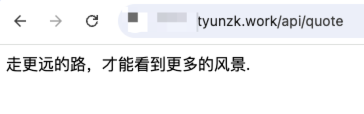
调取效果
评论 (0)