



服务器间无论是做免密还是利用password命令,一定程度上还是需要人工干预,要全自动无人值守交互,则需要用到一个高级工具:Expect
核心命令:
- spawn:是Expect的初始命令,用于启动一个交互进程,之后所有expect操作都在这个进程中进行
- expect:命令用于等候一个相匹配的输出,一旦匹配就执行后面的动作,常用的参数就是-re表示使用正则表达式的方式匹配
- send:是expect中的动作命令,向进程发送输入内容
- exp_send 用于发送指定的字符串信息
- exp_continue 在expect中等待多次匹配交互(继续等待下一个提示)
- send_user 用来打印输出 相当于shell中的echo
- exit退出expect中执行的脚本但不退出交互
- expect eof整个交互执行结束退出
- set 定义变量 puts 输出变量
- set timeout 设置超时时间
应用实例:
ssh远程登录主机执行命令
#!/usr/bin/bash
passwd='123456'
/usr/bin/expect << EOF
set time 30
spawn ssh user@192.168.56.103 df -Th
expect {
"*yes/no" { send "yes\r"; exp_continue }
"*password:" { send "$passwd\r" }
}
expect eof
EOF
自动scp
#!/usr/bin/expect
spawn scp /etc/fstab user@172.20.110.199:/home/wht/
expect {
"yes/no" { send "yes\n";exp_continue }
"password" { send "123456wht\n" }
}
expect eof
批量登陆远程主机并执行命令:
cat >> ip.txt << EOF
192.168.55.21
192.168.55.22
192.168.55.23
EOF

!/bin/bash
passwd='Ys@123456'
for i in `cat ip.txt`
do
/usr/bin/expect <<-EOF
set time 30
spawn ssh root@$i yum -y install wget && wget http://10.196.22.171/download_agent.sh && chmod 777 download_agent.sh && bash download_agent.sh
expect {
"*yes/no" { send "yes\r"; exp_continue }
"*password:" { send "$passwd\r" }
}
expect eof
EOF
done
执行命令在线执行脚本或安装:
!/bin/bash
passwd='Ys@123456'
for i in `cat zabbix.ip.txt`
do
/usr/bin/expect <<-EOF
set time 30
spawn ssh root@$i curl -k -s -L "http://10.192.2.240/a9_b8/zabbix.agent.sh" | bash
expect {
"*yes/no" { send "yes\r"; exp_continue }
"*password:" { send "$passwd\r" }
}
expect eof
EOF
done
shell调用expect执行多行命令
!/bin/bash
ip=$1
user=$2
password=$3
expect <<-EOF
set timeout 10
spawn ssh $user@$ip
expect {
"yes/no" { send "yes\n";exp_continue }
"password" { send "$password\n" }
}
expect "]" { send "useradd hehe\n" }
expect "]" { send "touch /tmp/test.txt\n" }
expect "]" { send "exit\n" } expect eof
EOF

./abc.sh 192.168.1.10 root 123456
Ctrl+C to stop 自动交互
!/bin/bash
echo "执行pkill nginx"
pkill nginx

echo "执行hugo server"
/usr/bin/expect << EOF
spawn hugo server --baseURL=https://xxxxxx.com --bind=0.0.0.0 --port=443
expect "Press Ctrl+C to stop"
send \x03  # 发送Ctrl+C的十六进制编码
expect eof
EOF

echo "开启nginx"
nginx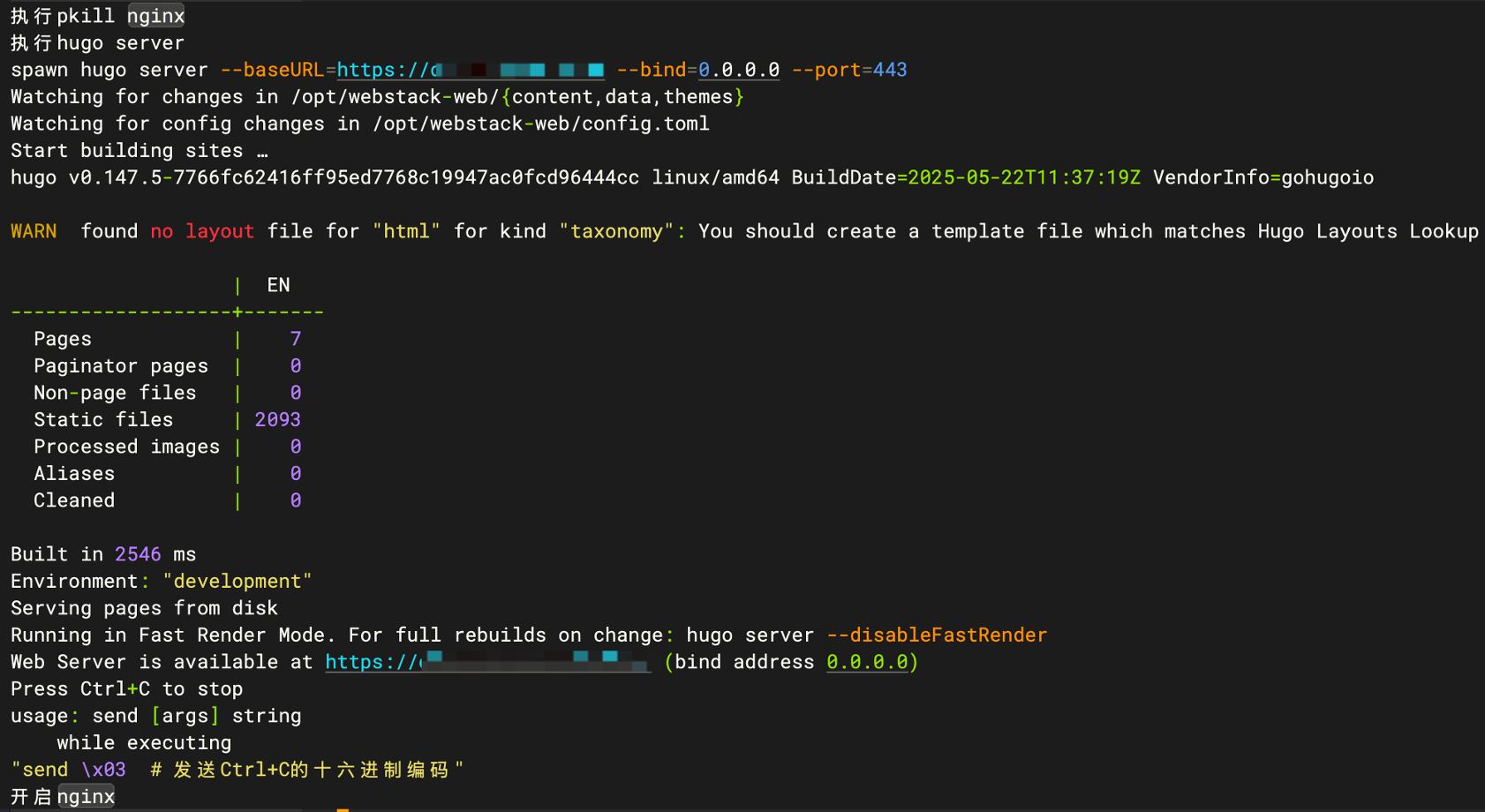
shell调用expect执行加密压缩
!/bin/bash
JMPD="123456"
cd /data/
/usr/bin/expect << EOF
spawn zip -e -r ./jm-web-$(date +"%Y-%m-%d").zip jm-web.work
expect {
"Enter password" { send "$JMPD\r"; exp_continue }
"Verify password:" { send "$JMPD\n" }
}
expect eof
EOF

# 检查备份是否成功
if [ $? -ne 0 ]; then
    echo "打包备份JM失败"
    exit 1
fi


评论 (0)